You have stunning projects, but clients aren’t really seeing them. Or rather—they see them, but not the way they should. Your portfolio page is likely just a long gallery of images that visitors scroll through without much engagement. A few seconds, a dozen thumbnails, and a closed tab. Meanwhile, behind every one of those projects lies a story—challenges, ideas, and a spatial transformation that changed someone’s daily life.
What if your portfolio could guide the client by the hand? What if, instead of passively browsing photos, visitors could have a conversation with a smart assistant that asks about their taste, shows them tailored projects, and seamlessly suggests a consultation at the end? That is exactly what you can achieve with a Messenger chatbot. In this article, I’ll show you step-by-step how to build an interactive portfolio that not only wows potential clients but also turns their interest into real business inquiries.
Why standard website portfolios are falling short
Before we dive into the solution, it’s worth understanding why traditional website galleries rarely do their job. The problem isn’t the quality of your designs—it’s the delivery. And that’s good news, because you can change your presentation much faster and more affordably than the level of your craft.
A typical portfolio subpage is a grid of thumbnails, sometimes grouped by category, sometimes displayed chronologically. A client lands there, sees dozens of images, and doesn’t know where to start. They don’t know which projects match their vision, which ones involve a similar square footage, or which ones fit their budget. The result? They scroll for a few seconds, maybe click one or two photos, and then head back to Google—likely landing on your competitor’s site.
User behavior studies show that the average time spent on a gallery page is just a few dozen seconds. That’s not enough time to tell a project’s story, show the transformation process, or trigger the emotional response needed to make a client reach out. A static gallery treats every visitor the same, whether they are looking for “tiny house” inspiration or planning a massive luxury renovation.
There’s another aspect interior designers rarely consider. A website portfolio is passive—it waits for the client to find it. You can’t easily use it in an Instagram ad, you can’t send it via DM in an engaging way, and you can’t use it for retargeting. It’s a closed ecosystem that only works if someone intentionally types in your URL or finds you through search.
What is an interactive portfolio and how it changes the game
An interactive portfolio on Messenger is a completely different approach. Instead of a static gallery, the client engages with a chatbot that acts as a personal design consultant. The bot asks questions, listens to the answers, and shows exactly the projects most likely to resonate with that specific person.
Imagine this from the client’s perspective: They click an Instagram ad, Messenger opens, and instead of a blank screen, they get a warm welcome: “Hi! I’d love to show you our best work. First, tell me—what design style inspires you?” Buttons appear below: Minimalist, Scandinavian, Modern, Glamour, Classic. The client picks “Scandinavian” and instantly receives a carousel of three projects in that exact style. Each image has a “See more” or “Read the story” button. This is no longer passive browsing; it’s a personalized experience that builds a relationship from the very first click.
The key difference is that an interactive portfolio adapts to the viewer. Someone interested in home staging will see “before and after” shots with a focus on sales results. A client looking for a full renovation will get a carousel with 3D renders and a breakdown of the scope of work. Everyone sees what actually matters to them, rather than a “dump” of everything at once.
How to build an interactive portfolio in ManyChat step-by-step
Building an interactive portfolio in ManyChat doesn’t require coding skills. The entire process uses a visual editor where you create a conversation flow by connecting message blocks and conditions. Here is a breakdown of each stage.
Curating your content
Before you start building the bot, you need to prepare the content it will showcase. This is the most important part of the process—the better the assets, the better the final result.
Choose five to ten of your absolute best projects. Don’t try to fit every project you’ve ever done into the portfolio. It’s better to show fewer projects but in a more thoughtful way. For each one, prepare a “media kit”: three to five top-tier photos (preferably square or 4:5 ratio, as they look best in Messenger carousels), a 2-3 sentence project summary, details on square footage/scope, and—if possible—a client testimonial or a short walk-through video.
Group your projects by style. If you specialize in three aesthetics—say, Minimalist, Scandi, and Modern—then three categories are plenty. Don’t create ten options; a long list of buttons just leads to choice paralysis.
The Welcome Screen and style quiz
The first message a client sees must make an impression. Start with a short, warm greeting and explain what’s about to happen. For example:
“Hi there! Welcome to our interactive portfolio. I’m going to show you our work based on your personal taste. It only takes a minute, and I guarantee you’ll find plenty of inspiration.”
Under this message, place buttons with the style names. Make sure the labels are clear to a layperson who might not know design jargon. Instead of “Eclectic,” you might use “Mixed Styles”; instead of “Industrial,” use “Loft style with brick & metal.” Think like a client, not an architect.
It’s also smart to add a “I’m not sure, surprise me!” button. This directs undecided users to your three most popular projects—the “crowd pleasers” that showcase your versatility.
Project Carousels
Once a style is selected, the chatbot sends a carousel—a horizontal set of cards the client can swipe through. Each card represents one project: a hero image, a title (e.g., “Mokotów Apartment, 700 sq ft”), and a brief description. Under each card, place two buttons: “See more photos” and “Read the project story.”
The carousel is a native format for Messenger and Instagram, meaning it looks beautiful on any device. It’s intuitive, visually engaging, and encourages interaction. The client doesn’t have to wait for a page to load; everything happens inside the chat. While ManyChat allows up to ten cards, I recommend sticking to 3 or 4. Too many options can be overwhelming, and your goal is to keep them focused on your best work.
If you want to go the extra mile, add a video card to the carousel. A short, 30-second interior walk-through makes a huge impact and sets you apart from competitors who only use static shots. The video doesn’t need to be a Hollywood production—a smooth phone recording with good lighting is often more authentic and effective.
Deep dives and testimonials
When a client clicks “See more photos,” the chatbot sends a mini-gallery of 3–5 additional shots. You can add captions describing the details: “Natural quartz countertop,” “Custom-designed lighting,” “Bespoke wardrobes with hidden handles.” These details prove you care about the small things and help the client envision that quality in their own home.
If they click “Read the project story,” the bot sends a short case study: what the starting point was, what challenges you faced, and the final result. Keep it brief—3 or 4 sentences is plenty. For example:
“The client dreamed of a bright, airy kitchen, but we only had 130 square feet to work with. We used floor-to-ceiling cabinetry and mirrored backsplashes to visually double the space. The result? A kitchen that feels twice as big and a client who finally loves cooking at home.”
After the case study, it’s a great idea to automatically trigger a testimonial related to that specific project. Social proof works in every industry, but in interior design—where the stakes are high and decisions are emotional—it is incredibly powerful.
“Before & After” shots
If your portfolio includes home staging or renovations, “Before & After” photos are an absolute goldmine for engagement. ManyChat lets you send multiple images in one message, so you can present the old and new spaces side-by-side.
Include a quick comment highlighting the impact: “Same apartment, same layout, completely different feel. A change in lighting and furniture meant this property sold in three weeks—20% over the asking price.” This doesn’t just look good; it proves the business value of your work.
The “Before & After” format works exceptionally well in ads leading into the funnel. People love transformations—it’s one of the most popular content formats on social media. Use that natural curiosity to draw them to your bot. You could even create a dedicated “Transformation” path in the bot with a “Show me some makeovers” button right on the welcome screen.
From inspiration to inquiry: transitioning to the sales funnel
An interactive portfolio shouldn’t end with just looking at pictures. Its main job is to trigger an emotion and a desire—and then turn that desire into action. That’s why, after the client has viewed a few projects, the bot should suggest the next step.
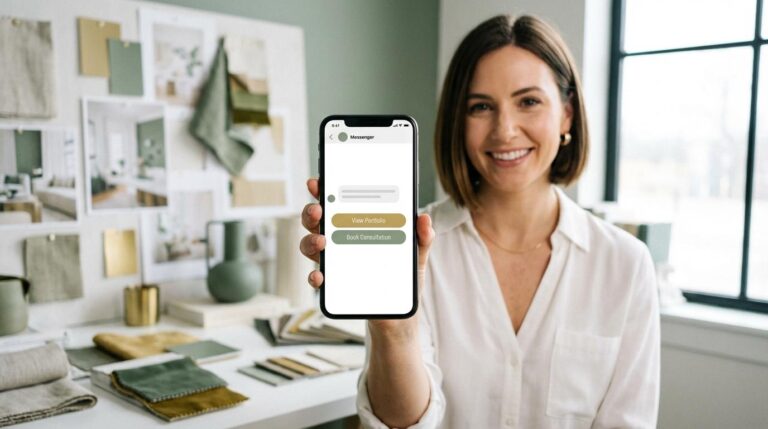
After two or three carousels, the bot sends a message: “I’m so glad you’re enjoying our work! How about we talk about your space? I’d love to hear what you’re planning and offer a quick consultation.” Underneath, two buttons appear: “Yes, let’s talk about my project” and “I’d like to see more work first.”
The first button leads into the qualification funnel (asking about property type, budget, etc.). The second button lets the client keep browsing. This is crucial—not everyone is ready to book a call after seeing the first three photos. Some people need more proof before they feel comfortable taking that next step.
The key is making this transition feel natural and low-pressure. The client shouldn’t feel like the bot is “selling” to them. It should feel like the logical next step after viewing inspiring work. Use an inviting tone: instead of “Book your consultation NOW!” try “If you’re interested, we can chat about your vision. No obligations.”
Where to use your interactive portfolio
One of the biggest advantages of a Messenger portfolio is its versatility. You can promote it almost anywhere:
Instagram Bio Link. This is the simplest and most effective use. Instead of linking to a static site, use a link that opens Messenger. Instagram users are visual by nature and already accustomed to DMs, making this a very smooth transition.
Ads. Create an ad with your best project photo and a CTA: “See our full portfolio—click to pick your style.” Since the “Messages” objective keeps the user inside the app they are already using, the conversion rate is often much higher than sending them to an external site.
Events and Trade Shows. If you attend interior design fairs or networking events, use a QR code that opens your bot. Instead of handing out a business card that will end up in a drawer, have them scan the code to instantly see your work. It’s modern, memorable, and gives you an instant lead.
Common mistakes to avoid
Building an interactive portfolio is easy, but watch out for these traps:
- Too many options at the start. If you show eight different styles on the welcome screen, you’ll overwhelm the client. Stick to 3–5.
- Poor image ratios. Messenger carousels are square. If you upload a wide panoramic shot, it will be cropped awkwardly. Crop your photos beforehand to ensure the “wow” factor remains intact.
- No “Call to Action” (CTA). If the bot doesn’t suggest a next step after the portfolio, the client will just close the chat. Always end with an invitation to talk.
- Walls of text. Messenger is for quick chats. Keep descriptions to 3 sentences max. If it takes more than 5 seconds to read, they won’t read it.
Summary: Let your portfolio tell a story
A static image gallery on a website is the old standard. In an industry where emotion and aesthetics drive the decision to hire a designer, how you show your work is just as important as the work itself. An interactive portfolio on Messenger lets you stand out, build a relationship before the first meeting, and naturally turn inspiration into business inquiries.
You don’t need a developer’s budget for this. You just need ManyChat, a set of great photos, some engaging copy, and a thoughtful conversation path. Start small—pick five projects and build your first flow. You can refine it over time based on real data, and you’ll see the results faster than you think.
Want us to help you build an interactive portfolio that wows your clients? Get in touch with us—we’ll design a tailored solution that fits your studio’s unique brand perfectly.
Get started with ManyChat and get 30% off
Test ManyChat at a lower price and claim 30% off for your first 3 months.